



Best Gaming Mini PC in 2026: Top Compact PCs for Every Budget
Gaming mini PCs have improved significantly over the past few years. Many now feature high-performance AMD Ryzen AI or Intel Core Ultra processors, fast DDR5 memory, PCIe 4.0 SSDs, and even dedicated NVIDIA RTX graphics. For many gamers, they offer enough performance for modern titles while taking up only a fraction of the desk space of a traditional gaming tower.
This guide explains what to look for in a gaming mini PC, compares the available hardware, and recommends the best options for different budgets.
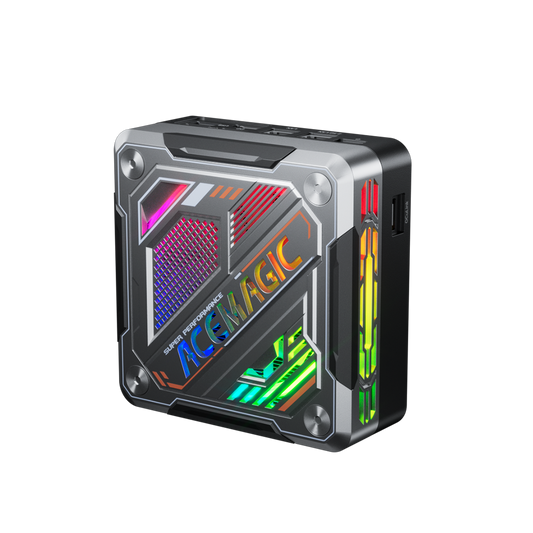
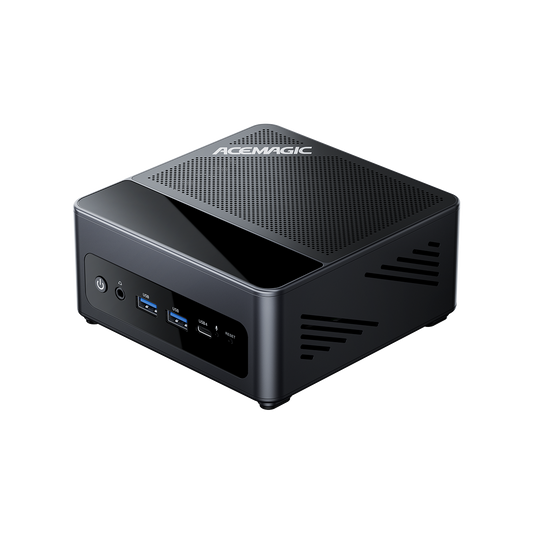
Quick answer: The ACEMAGIC M1A Pro is our best overall gaming mini PC because its dedicated Intel Arc A770 graphics offer substantially more gaming performance than integrated Radeon graphics. The W1 is the better choice for upgradeability, while the F5A offers better value and future eGPU expansion through OCuLink.

Key Takeaways
- GPU Priority: The graphics processor determines gaming performance more than any other component, with dedicated RTX graphics leading the pack for AAA titles.
- Modern CPUs are AI-Ready: Recommended systems feature AMD Ryzen AI 9 or Intel Core Ultra processors for strong multitasking and productivity.
- Optimal Memory & Storage: We recommend 32GB of DDR5 RAM and at least a 1TB PCIe 4.0 SSD for the best headroom in modern gaming and streaming.
- Cooling is Crucial: Effective thermal management, like vapor chambers and dual-fan setups, prevents thermal throttling during long sessions.
What Is a Gaming Mini PC?
A gaming mini PC is a compact desktop computer designed to run PC games. Unlike entry-level mini PCs built for office work, gaming models include more powerful CPUs, faster graphics, better cooling, and higher-speed memory.
Most gaming mini PCs fall into two categories:
- Integrated graphics models using AMD Radeon 780M, 880M, or 890M graphics.
- Dedicated GPU models equipped with NVIDIA GeForce RTX mobile graphics.
- Intel Arc discrete GPU equipped with Intel Arc discrete graphics.
The first category is suitable for esports games and many AAA titles at reduced settings, while the second delivers a gaming experience much closer to a traditional gaming desktop.
How to Choose the Best Gaming Mini PC
1. GPU Is the Most Important Component
The graphics processor determines gaming performance more than any other component.
Integrated Graphics Recent AMD processors have made integrated graphics much more capable. Recommended options include the Radeon 780M, Radeon 880M, and Radeon 890M. These GPUs are suitable for Fortnite, Valorant, League of Legends, Dota 2, Rocket League, GTA V, and many AAA games at 1080p with medium settings.
Dedicated Graphics For higher resolutions and maximum settings, choose a mini PC with an NVIDIA RTX 4060 Laptop GPU, NVIDIA RTX 4070 Laptop GPU, or NVIDIA RTX 5070 Laptop GPU (where available). Dedicated graphics offer higher frame rates, better ray tracing performance, DLSS support, and better streaming and content creation performance.
Intel Arc discrete GPU For users who want a dedicated graphics solution from Intel, Arc discrete GPUs offer solid 1080p gaming performance, hardware ray tracing, XeSS upscaling, and strong media encoding/decoding capabilities. They are a good middle ground for light-to-moderate gaming and creation workloads, especially in thinner or more power-efficient systems.
Gaming Performance by GPU Type
| Graphics Level | Example Games | Target Settings | Expected Use |
|---|---|---|---|
| Radeon 780M | Valorant, Fortnite, GTA V | 1080p Low–Medium | Esports and lighter games |
| Radeon 890M | Modern esports and selected AAA games | 1080p Medium | Mainstream gaming |
| Intel Arc A770 | Modern AAA games | 1080p High / selected 1440p | Higher-quality gaming |
| RTX 4060/5060 | Demanding AAA games | 1440p High with upscaling | Premium gaming |
2. Choose a Modern CPU
Recommended processors include:
- AMD: Ryzen AI 9 HX 370, Ryzen 9 8945HS, Ryzen 7 8845HS.
- Intel: Core Ultra 9, Core Ultra 7.
These processors provide enough performance for gaming, multitasking, streaming, and productivity.
3. Memory
- Minimum: 16GB DDR5
- Recommended: 32GB DDR5
If you stream, edit videos, or keep many applications open while gaming, 32GB provides a smoother experience.
4. Storage
Choose at least a 1TB PCIe 4.0 SSD, but consider 2TB if you install many games. Modern AAA games often require 100GB or more of storage.
5. Cooling
Gaming performance depends on effective cooling. Look for dual-fan cooling, vapor chamber cooling, large heatsinks, and multiple air vents. Better cooling reduces thermal throttling and helps maintain consistent performance during long gaming sessions.
6. Connectivity
Useful features include USB4, Thunderbolt 4 (Intel models), HDMI 2.1, DisplayPort, Wi-Fi 7, and 2.5Gb Ethernet. These ports support high-refresh-rate monitors, external storage, and fast networking.
Best Gaming Mini PCs in 2026
Best Overall Gaming Mini PC: ACEMAGIC M1A Pro
Why we recommend it: The ACEMAGIC M1A Pro is the strongest all-around gaming mini PC in this lineup. With an Intel Core i9 processor and RTX 5060, it delivers excellent 1080p and 1440p gaming performance while also handling streaming, video editing, and AI workloads without breaking a sweat under load.
- Pros:
- Intel® Iris® Xe Graphics eligible & NVIDIA GeForce RTX™ 5060
- Intel Core i9-13900HK with 14 cores and 20 threads
- Suitable for demanding 1080p and selected 1440p games
- 32GB of dual-channel DDR5-5200 memory
- Two PCIe 4.0 NVMe SSD slots supporting up to 4TB
- Three-fan cooling system
- Extensive display, USB and network connectivity
- Windows 11 Pro included
- Cons:
- Larger than a conventional office-focused mini PC
- Maximum supported memory is limited to 32GB
- The processor and graphics card are not user-upgradeable
- Higher power consumption than mini PCs using integrated graphics
- Best for: AAA gaming, 1440p gaming, Streaming, Content creation.

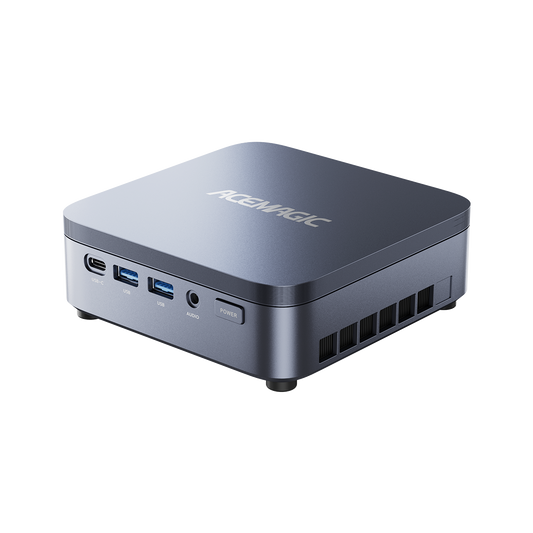
Best Upgradeable Gaming Mini PC: ACEMAGIC W1 (Ryzen 7 H255)
Why we recommend it: The W1 combines the Ryzen 7 H255 processor with Radeon 780M graphics, delivering excellent performance for esports titles and many AAA games at 1080p. Unlike many compact systems with soldered memory, it features two DDR5 SO-DIMM slots supporting up to 128GB of RAM and dual PCIe 4.0 M.2 SSD slots, making it one of the most upgrade-friendly gaming mini PCs in its class. It also includes USB4, HDMI 2.1, DisplayPort 2.0, Wi-Fi 6E, and 2.5Gb Ethernet.
- Pros: Ryzen 7 H255 (8 cores / 16 threads), Radeon 780M RDNA 3 graphics, Upgradeable DDR5 memory, Dual PCIe 4.0 SSD slots, USB4 and triple-display support, Strong value for money.
- Cons: Integrated graphics cannot match dedicated RTX GPUs, Best suited for 1080p gaming.
- Best for: Gamers who want future upgradeability, 1080p gaming, Esports titles, Everyday productivity.

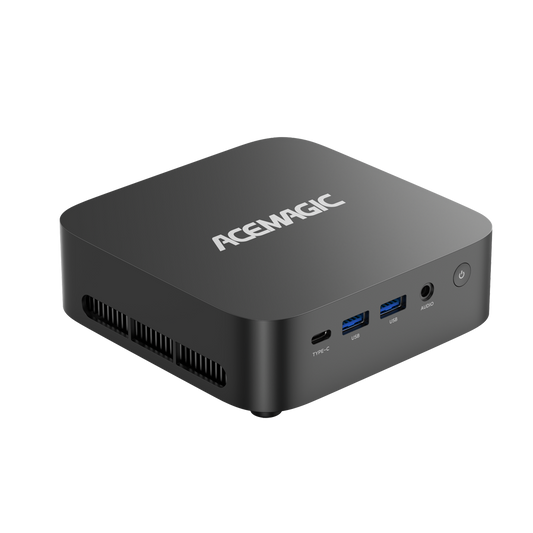
Best Value Gaming Mini PC: ACEMAGIC F5A (Ryzen 7 H255)
Why we recommend it: The F5A delivers impressive gaming performance at an affordable price. It shares the same Ryzen 7 H255 processor and Radeon 780M graphics as the W1 but distinguishes itself with an OCuLink port, allowing users to connect an external GPU for a substantial graphics upgrade in the future.
- Pros: Excellent price-to-performance ratio, Radeon 780M graphics, OCuLink support for eGPU expansion, Quiet operation.
- Cons: Memory is soldered and not user-upgradeable, Better suited for 1080p than 1440p gaming.
- Best for: Budget-conscious gamers, Users planning to add an external GPU later, Esports and mainstream gaming.

Best Premium Gaming Mini PC: ASUS ROG NUC
Why we recommend it: The ASUS ROG NUC proves that you can squeeze immense, next-generation gaming and AI performance into an incredibly small footprint. Sitting at just 2.5 to 3 liters, it features high-end Intel Core Ultra processors and NVIDIA RTX mobile graphics. It is a masterpiece of thermal engineering, utilizing a robust vapor chamber cooling system that keeps the system whisper-quiet even under heavy gaming or rendering loads. It also offers a highly versatile design that can be placed horizontally or vertically, fitting seamlessly into both traditional desk setups and living room environments.
- Pros: Outstanding gaming and AI performance for its size, ultra-compact 2.5L–3L chassis, whisper-quiet vapor chamber cooling, excellent port selection (including Thunderbolt 4 and multiple display outputs), toolless entry for easy SSD and RAM upgrades.
- Cons: Premium price tag, CPU and GPU are permanently soldered (like a laptop) meaning no future graphics upgrades, heavily reliant on a large external power brick.
- Best for: High-end gaming, 1440p and entry-level 4K gaming, Professional creators.
Best Compact Gaming Desktop: ZOTAC MAGNUS ONE
Why we recommend it: The ZOTAC MAGNUS ONE bridges the gap between a true mini PC and a traditional desktop tower. At 8.3 liters, it is significantly larger than typical mini PCs, but it uses that extra space to house socketed desktop-class processors and a full-size dedicated NVIDIA RTX desktop graphics card. This means it delivers uncompromised, raw desktop performance. Additionally, it features an internal power supply, completely eliminating the need for a bulky external power brick on your desk.
-
Pros: Desktop-level performance using a full-size desktop GPU, highly compact (8.3L) compared to standard towers, built-in internal power supply, excellent connectivity including an SD card reader, clean and unassuming aesthetic.
- Cons: The fans can get noticeably loud under heavy gaming loads, upgrade potential is strictly limited by the physical space and the capacity of the internal 500W power supply, plain visual design lacks the flair of typical gaming hardware.
- Best for: Desktop-level gaming performance, Enthusiasts, Users who prioritize GPU power in a compact chassis.
Quick Comparison
| Model | Processor | Graphics | RAM Capability | Storage Support | Best For |
| ACEMAGIC M1A Pro | Intel Core i9 | RTX 5060 | Up to 32GB DDR5 | PCIe 4.0 SSD | Best Overall |
| ACEMAGIC W1 | Ryzen 7 H255 | Radeon 780M | Up to 128GB DDR5 | PCIe 4.0 SSD | Best Upgradeable |
| ACEMAGIC F5A | Ryzen 7 H255 | Radeon 780M + OCuLink | LPDDR5 | PCIe 4.0 SSD | Best Value |
| ASUS ROG NUC | High-End Intel | NVIDIA RTX | DDR5 | PCIe 4.0 SSD | Best Premium |
| ZOTAC MAGNUS ONE | Desktop CPU | Desktop NVIDIA RTX | DDR4 | NVMe SSD | Best Compact Gaming Desktop |
Can a Mini PC Replace a Gaming Desktop?
For many users, yes. A gaming mini PC is an excellent choice if you play at 1080p or 1440p, have limited desk space, want lower power consumption, or prefer a compact, quiet setup.
A traditional desktop is still the better option if you frequently upgrade components, need maximum GPU performance, or plan to install multiple expansion cards or storage drives.
Buying Guide
- Entry-Level Gaming: Recommended specifications include a Ryzen 7 processor, Radeon 780M graphics, 16GB RAM, and a 1TB SSD. Ideal for League of Legends, Valorant, Minecraft, and Rocket League.
- Mid-Range Gaming: Recommended specifications include a Ryzen AI 9 HX 370, Radeon 890M, 32GB RAM, and a 1TB SSD. Ideal for most modern games at 1080p and some AAA games at 1440p using upscaling.
- High-End Gaming: Recommended specifications include an Intel Core Ultra 9 or Ryzen AI 9, RTX 4060, RTX 4070, or newer, 32GB RAM, and a 2TB SSD. Ideal for AAA gaming, streaming, content creation, and high-refresh-rate monitors.
Final Verdict
Gaming mini PCs have become a practical choice for gamers who want strong performance without a large desktop tower. For most users, a system with an AMD Ryzen AI processor, Radeon 890M graphics, 32GB of DDR5 memory, and a 1TB SSD offers the best balance of gaming performance, productivity, and value.
If you regularly play demanding AAA games or want the highest frame rates, a mini PC with an NVIDIA RTX 4060 or RTX 4070 is the better investment. Before buying, focus on the GPU first, then choose a modern processor, sufficient memory, and effective cooling. With the right hardware, a gaming mini PC can deliver an excellent gaming experience while saving space and consuming less power than a traditional desktop.
Frequently Asked Questions
Is 32GB RAM worth it for a gaming mini PC?
Yes, 32GB of RAM is worth it because it provides more headroom for newer titles, multitasking, streaming, and content creation, even though 16GB is still sufficient for many older games.
Is a gaming mini PC better than a gaming laptop?
Usually, no—a gaming mini PC is not outright better than a gaming laptop. A mini PC is better if you mostly play at a desk and want easier upgrades or quieter, more flexible setup options, while a gaming laptop is better if you need portability and an all-in-one machine.
How many GB does 1 hour of gaming take up?
It depends on whether you mean installed game size or recorded gameplay. Playing a game does not normally use much storage by itself, but recording gameplay can use a lot; at 1080p, one hour of recorded video can easily take several GB or more depending on bitrate and codec.
How do I know if a PC is good for gaming?
A PC is good for gaming if it has a dedicated GPU, at least 16 GB of RAM, a modern CPU (such as a recent Ryzen 5/7 or Intel i5/i7), and SSD storage instead of only a hard drive. The GPU matters most for gaming performance, while the CPU, RAM, and storage affect smoothness, loading times, and how well the system handles newer games.
How long will a $1000 gaming PC last?
A $1000 gaming PC can last a long time, but how well it stays relevant depends mostly on the GPU and your target resolution and settings. A sensible expectation is several years of good 1080p gaming, with the need to lower settings sooner in newer games as they become more demanding.
Is a gaming mini PC better than a gaming laptop?
A gaming mini PC is often better than a gaming laptop for value, noise control, and sustained performance, because it usually has more cooling room than a laptop at a similar price point. A gaming laptop wins if you need portability and an all-in-one setup with a screen, keyboard, battery, and built-in controls.
Will a gaming mini PC overheat?
A gaming mini PC can overheat if it has weak cooling, poor airflow, dust buildup, or too much load for the hardware. Good models are designed to handle gaming loads, but you still want clear ventilation space, regular cleaning, and a chassis with a strong thermal design.
What storage should I get when buying a gaming mini PC?
For a gaming mini PC, you should get an NVMe SSD if possible, and aim for at least 1 TB if you play multiple modern games. 512 GB works only if you play a small library, because modern games can fill storage quickly, and HDD-only systems are too slow for a good gaming experience.