



Back to School Laptop Guide (2026): Best Specs, Budget Tips & Buying Advice for Students
Choosing a back-to-school laptop doesn't have to be complicated. For most high school and college students, a laptop with 16GB RAM, an Intel Core Ultra 5 or AMD Ryzen AI 5 processor, and a 512GB SSD offers the best balance of performance, battery life, and value in 2026.
The right laptop depends on your major, budget, and daily workload. In this guide, you'll learn which specifications matter most, how much you should spend, and how to choose a laptop that will stay reliable throughout your studies.
In this guide, you'll learn:
- The ideal laptop specifications for different majors
- How much RAM and storage you actually need
- What features are worth paying for—and which you can skip
- How to choose the best laptop based on your budget
- Whether a laptop or a mini PC is the better investment for your study setup

Quick Answer: What Is the Best Back-to-School Laptop?
If you're looking for a fast recommendation, use this table as a starting point.
| Student Type | Recommended Specs | Ideal Budget |
| High school | Intel Core 5 or AMD Ryzen 5, 16GB RAM, 512GB SSD | $500–$700 |
| Most college students | Intel Core Ultra 5 or Ryzen AI 5, 16GB RAM, 512GB SSD | $700–$1,000 |
| Engineering & Computer Science | Core Ultra 7 or Ryzen AI 7, 32GB RAM, 1TB SSD | $1,000–$1,500 |
| Design & Media | Core Ultra 7 or Ryzen AI 7, Dedicated GPU, 32GB RAM, 1TB SSD | $1,200+ |
Bottom line: If you're unsure which configuration to buy, choose 16GB RAM and a 512GB SSD. This combination offers enough performance for multitasking, online classes, research, and productivity software while providing room for future needs.
How We Evaluated Student Laptops
Rather than focusing on brand names, this guide evaluates student laptops based on the features that matter most in everyday academic life.
Our recommendations prioritize:
- Performance for multitasking and coursework
- Battery life that lasts through a full day of classes
- Portability for carrying between lectures
- Display quality for reading, writing, and media consumption
- Keyboard comfort for long study sessions
- Long-term value, ensuring the laptop remains useful throughout a typical three- to four-year degree
This approach helps you choose a laptop that fits your needs instead of paying for hardware you'll rarely use.
How Much Laptop Performance Do You Really Need?
One of the biggest mistakes students make is buying either too much or too little performance. Here's what different workloads require.
For High School Students
Most high school assignments involve:
- Google Classroom
- Microsoft Office
- Web research
- Video streaming
- Online learning platforms
These tasks don't require expensive hardware.
Recommended Specs
- Intel Core 5 or AMD Ryzen 5
- 16GB RAM
- 512GB SSD
- Full HD display

Although 8GB of RAM can still handle basic tasks, 16GB is the better long-term investment. Modern browsers, AI-powered productivity tools, and multitasking consume more memory than they did just a few years ago.
For Most College Students
College students typically juggle:
- Multiple browser tabs
- PDF textbooks
- Microsoft Office
- Google Workspace
- Zoom or Microsoft Teams
- Research databases
- Music streaming
This workload benefits from a modern mid-range processor and additional memory.
Recommended Specs
- Intel Core Ultra 5
- AMD Ryzen AI 5
- 16GB RAM
- 512GB SSD
This configuration offers excellent responsiveness while keeping costs under control.
For Engineering and Computer Science Students
Students in technical fields often run resource-intensive software, such as:
- Visual Studio
- IntelliJ IDEA
- Docker
- Virtual machines
- MATLAB
- AutoCAD
- SolidWorks
These applications require more processing power and memory than general productivity software.
Recommended Specs
- Intel Core Ultra 7
- AMD Ryzen AI 7
- 32GB RAM
- 1TB SSD
If your coursework includes AI development, 3D modeling, or GPU-accelerated computing, a laptop with a dedicated graphics card can significantly improve performance.
For Creative Majors
Graphic design, photography, animation, and video production place heavy demands on both the processor and graphics hardware.
Applications like Adobe Photoshop, Premiere Pro, After Effects, and Blender benefit from:
- A powerful CPU
- Dedicated GPU
- Color-accurate display
- Large SSD
Recommended Specs
- Core Ultra 7 or Ryzen AI 7
- NVIDIA RTX graphics (if required)
- 32GB RAM
- 1TB SSD
- IPS or OLED display with good color accuracy
Choosing a laptop with sufficient storage also reduces the need for external drives when working with large media files.

How Much RAM Does a Student Need in 2026?
RAM is one of the most important specifications because it affects how smoothly your laptop handles multitasking.
| RAM | Best For | Recommendation |
| 8GB | Light schoolwork | Acceptable, but not ideal for long-term use |
| 16GB | Most students | ✅ Best balance of performance and value |
| 32GB | Engineering, AI, creative work | Recommended for demanding software |
| 64GB | Professional workloads | Unnecessary for most students |
As AI-powered features become more common in Windows and productivity applications, 16GB has become the practical minimum for students who expect to keep their laptop for several years.
💡Tip: If you're deciding between a faster processor and more RAM, upgrading to 16GB of memory often delivers a more noticeable improvement in everyday multitasking.
How Much Storage Do You Need?
Storage determines how many applications, documents, and media files your laptop can hold.
| SSD Capacity | Recommended For |
| 256GB | Basic schoolwork |
| 512GB | Most students |
| 1TB | Engineering, creative majors, large projects |
| 2TB+ | Professional content creation |
A 512GB SSD provides enough room for coursework, productivity software, and personal files without filling up too quickly.
Students working with videos, CAD projects, or software development environments should consider upgrading to 1TB.
Which Processor Should You Choose?
Processor names have become increasingly complex, but choosing one doesn't have to be.
Entry-Level
Suitable for:
- Web browsing
- Office work
- Online classes
Examples:
- Intel Core 5
- AMD Ryzen 5
Mid-Range (Best Value)
Ideal for:
- Most college students
- Heavy multitasking
- Long-term use
Examples:
- Intel Core Ultra 5
- AMD Ryzen AI 5
High Performance
Recommended for:
- Engineering
- Programming
- AI
- Creative software
Examples:
- Intel Core Ultra 7
- AMD Ryzen AI 7
Avoid paying extra for flagship processors unless your coursework genuinely requires maximum computing power. For many students, investing in more RAM or storage provides greater everyday benefits than upgrading to the fastest available CPU.
How Much Should You Spend on a Back-to-School Laptop?
The best laptop isn't necessarily the most expensive one. Your budget should reflect your coursework and how long you plan to use the device.
For most students, spending $700–$1,000 delivers the best balance of performance, portability, and longevity.
| Budget | What You Can Expect | Best For |
| Under $500 | Entry-level processor, 8–16GB RAM, 256–512GB SSD | High school students, light productivity |
| $500–$700 | Modern mid-range CPU, 16GB RAM, 512GB SSD | Budget-conscious college students |
| $700–$1,000 | Core Ultra 5/Ryzen AI 5, 16GB RAM, 512GB SSD | Best value for most students |
| $1,000–$1,500 | Faster CPU, 32GB RAM, optional dedicated GPU | Engineering, CS, architecture |
| $1,500+ | Premium display, high-end GPU, larger SSD | Video editing, 3D design, AI development |
Budget Tips
- High school students: A reliable Windows laptop with 16GB RAM is usually enough.
- Most college students: Prioritize RAM and SSD capacity over the fastest processor.
- Technical majors: Allocate more of your budget toward memory, storage, and graphics performance if your coursework requires it.
- Creative majors: Invest in a better display and GPU rather than simply buying the most expensive processor.
💡Buying Tip: Student discounts from manufacturers and retailers are most common between July and September, making the back-to-school season one of the best times of the year to purchase a laptop.
Essential Features Students Often Overlook
CPU and RAM are important, but they aren't the only factors that affect your daily experience.
Battery Life
Battery life is one of the biggest quality-of-life features for students.
Look for laptops that offer at least 8–10 hours of real-world battery life. If you spend an entire day moving between lectures, a long-lasting battery means you won't need to carry a charger everywhere.
Display
You'll spend hours reading, writing, and watching lectures, so don't overlook screen quality.
Look for:
- Full HD (1920×1080) or higher resolution
- IPS panel for wider viewing angles
- 300+ nits of brightness for better visibility
- 14-inch displays for the best balance of portability and workspace
OLED displays provide richer colors and deeper contrast but typically cost more and may reduce battery life.
Keyboard and Touchpad
Students type thousands of words every semester.
Choose a laptop with:
- Comfortable key travel
- Backlit keyboard
- Large, responsive touchpad
A good keyboard can make long writing sessions significantly more comfortable.
Webcam and Microphone
Although online learning isn't as common as it was a few years ago, video conferencing remains a regular part of many courses.
A 1080p webcam with decent microphones will improve your experience during:
- Online classes
- Group meetings
- Internship interviews
- Virtual presentations
Ports and Connectivity
Before buying, check that the laptop includes the ports you need.
Recommended options include:
- USB-C
- USB-A
- HDMI
- 3.5 mm headphone jack
- Wi-Fi 6E or Wi-Fi 7
- Bluetooth 5.3 or newer
If your laptop has limited ports, you may also need a USB-C hub.
Laptop vs. Mini PC for Students
Most students automatically assume a laptop is the only option for school. However, if you primarily study in a dorm room, apartment, or home office, a mini PC can be a practical alternative.
Here's how they compare.
| Feature | Laptop | Mini PC |
| Portability | ⭐⭐⭐⭐⭐ | ⭐ |
| Built-in display | ✅ | ❌ |
| Built-in battery | ✅ | ❌ |
| Performance per dollar | ⭐⭐⭐ | ⭐⭐⭐⭐⭐ |
| Upgradeability | Limited | Usually better |
| Ideal use | Classes and travel | Dorm room or home study |
Choose a Laptop If You:
- Carry your computer to class every day
- Frequently work in libraries or coffee shops
- Need a built-in battery for all-day use
- Prefer an all-in-one solution

ACEMAGIC S16 Laptop
A powerful 16-inch laptop engineered for seamless daily productivity and smooth multitasking.
- AMD Ryzen™ 7 H255 Processor (up to 4.9 GHz)
- 24GB LPDDR5 RAM
- 512GB SSD Storage
- 16-inch 16:10 IPS Display
Choose a Mini PC If You:
- Already own a monitor, keyboard, and mouse
- Mostly study from your dorm or home
- Want more performance for the same budget
- Need additional ports or easier upgrades

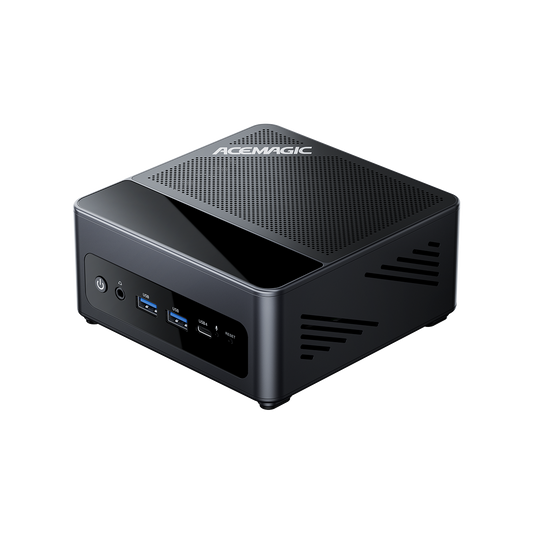
ACEMAGIC K1 Mini PC
A compact and versatile desktop system built for everyday multitasking, productivity workflows, and smooth home entertainment.
- AMD Ryzen™ 5 7430U CPU
- AMD Radeon™ RX Vega 8 Graphics
- 16GBLPDDR4XRAM + 512GB SSD
- Enhanced Cooling & Versatile Port Connectivity
A Hybrid Setup Can Be the Best of Both Worlds
Some students combine a lightweight laptop with a desktop-style setup at home.
For example:
- On campus: A thin, lightweight laptop for note-taking, assignments, and group projects.
- At home or in a dorm: A mini PC connected to a larger monitor for coding, content creation, gaming, or AI workloads.
This setup gives you portability during the day while providing a more comfortable workstation for longer study sessions.
Frequently Asked Questions
What is the best back-to-school laptop for college students?
For most college students, the best back-to-school laptop has an Intel Core Ultra 5 or AMD Ryzen AI 5 processor, 16GB RAM, and a 512GB SSD. This configuration delivers enough performance for online classes, research, Microsoft Office, web browsing, and multitasking while offering the best balance of price, battery life, and long-term value.
Is 16GB RAM enough for college students in 2026?
Yes. For most students, 16GB RAM is the recommended standard in 2026. It provides smooth performance for multitasking, productivity apps, video conferencing, and AI-powered features. Students using CAD, programming tools, video editing software, or virtual machines should consider 32GB RAM.
How much SSD storage does a student need?
Most students should choose a 512GB SSD, which provides enough space for documents, applications, coursework, and media files. If you study engineering, computer science, or creative media, a 1TB SSD is a better choice for storing larger projects and software.
Should students buy a Windows laptop or a MacBook?
A Windows laptop is the best choice if your coursework requires specialized software, engineering applications, or greater hardware flexibility. A MacBook is ideal for students who prioritize battery life, portability, and the Apple ecosystem. Before buying, check your school's recommended hardware requirements.
Are gaming laptops good for college?
Gaming laptops are suitable for engineering, 3D design, and other GPU-intensive courses, but they aren't the best option for most students. Compared with standard productivity laptops, gaming models are usually heavier, louder, more expensive, and have shorter battery life. For everyday coursework, a thin-and-light laptop is typically the better choice.
When is the best time to buy a back-to-school laptop?
The best time to buy a back-to-school laptop is July through September, when manufacturers and retailers offer seasonal student discounts. You can also find competitive prices during Amazon Prime Day, Black Friday, and Cyber Monday, although back-to-school promotions often include student-specific offers.
Is a Chromebook good enough for college?
A Chromebook is suitable for students who primarily use Google Docs, web browsers, email, and online learning platforms. If your major requires Windows software, Adobe Creative Cloud, programming tools, CAD, or engineering applications, a Windows laptop is the better option.
Can a mini PC replace a laptop for school?
A mini PC can replace a laptop if you mainly study from a dorm room or home office and already have a monitor, keyboard, and mouse. However, students who attend classes on campus every day will benefit more from a laptop's portability and built-in battery. Some students use both: a laptop for class and a mini PC as a desktop workstation.
Conclusion
The best back-to-school laptop is the one that fits your major, your budget, and your daily routine. For most students, a modern laptop with 16GB RAM, a 512GB SSD, and a Core Ultra 5 or Ryzen AI 5 processor strikes the ideal balance of performance, portability, and longevity.
Before making a purchase:
- Identify the software your courses require.
- Choose a configuration that will remain capable for at least four years.
- Prioritize battery life, portability, and display quality alongside performance.
- Buy during seasonal student promotions whenever possible.
By focusing on the features that matter most, you'll be better prepared for classes—and avoid overspending on hardware you don't need.